Organiser Guide › Running an event › Plan, billing & legal
Organiser
Plan, billing & legal
Money on Yuimaru comes in two very different kinds, and it really helps to keep them apart in your head. Once you have, this whole chapter is easy: your yearly subscription, your invoices, and the legal documents that keep everyone protected.
There are two different kinds of money here. (1) Your subscription — what Yuimaru charges you, once a year, to use the platform. (2) Ticket payments — what attendees pay you for their tickets, directly through your own payment account or bank. Yuimaru never touches ticket money and takes 0% commission on it. The subscription is the only thing Yuimaru bills you for.
Plan & billing
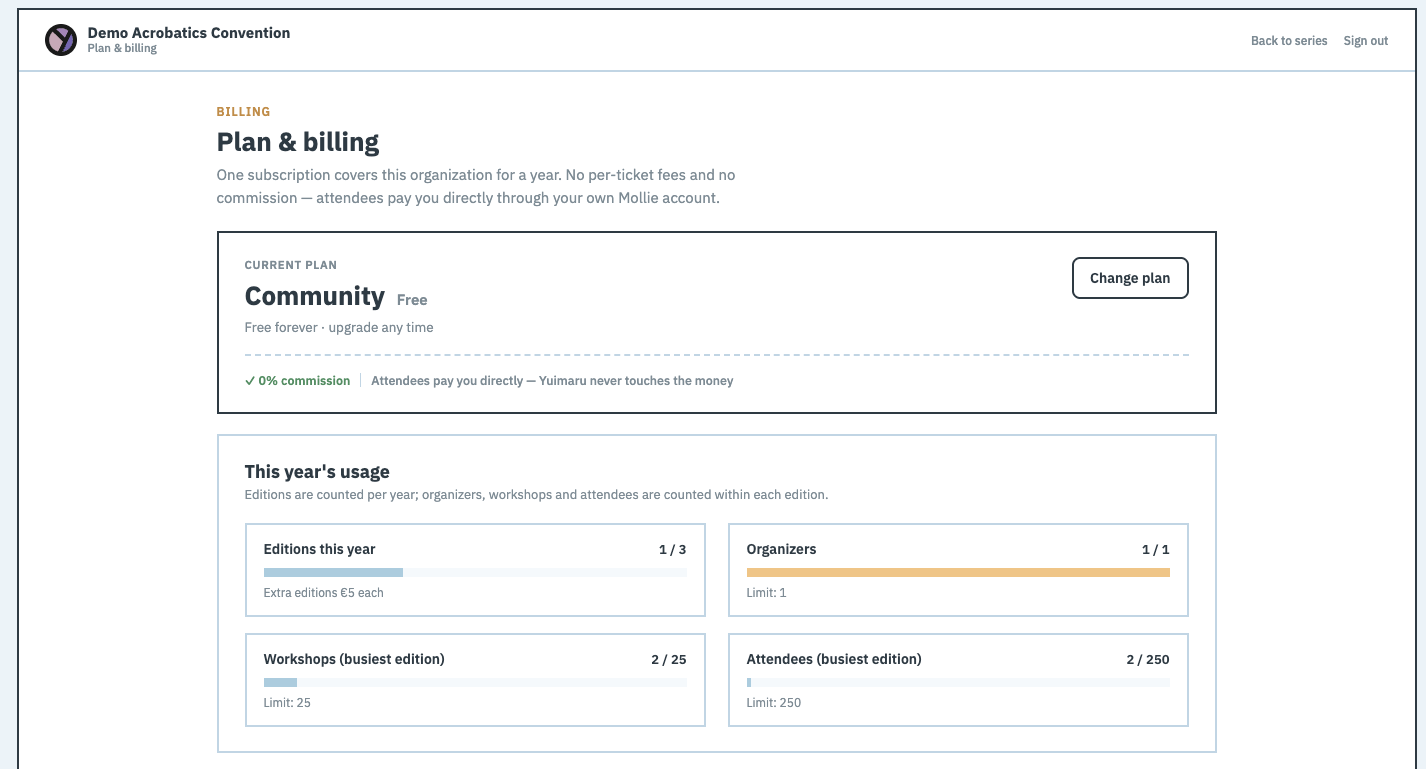
In your series top bar, click Billing. You'll land on a screen headed "Plan & billing" with the line "One subscription covers this organization for a year. No per-ticket fees and no commission" — attendees pay you directly, through your own payment account or bank. That line is the whole promise in one sentence.
Your current plan
At the top sits a card showing your current plan — its name, its price per year, and its status (for example "Auto-renews on 1 March 2027", which just means it will quietly continue for another year on that date). Two buttons sit with it: Change plan to move up or down, and Cancel plan if you want to stop. Cancelling isn't instant or scary — it asks you to Confirm cancel first, so you can't do it by accident.
This year's usage
Below that is a "This year's usage" area. It shows a few simple meters — how many editions, organizers, workshops, and attendees you've used — each shown against the limit your plan includes. It's just a friendly way to see how much room you have left before you'd want a bigger plan.
If you go over what your plan includes, a gentle banner appears — "You've grown past your … plan" — with an Upgrade plan button. Nothing gets turned off and no attendee is affected. You simply have 14 days to upgrade at your own pace. It's a nudge, not a penalty.
Invoices
Further down is an "Invoices" list — one line per year you've been billed. Each has a Download button that saves the invoice as a file, ready for your records or your accountant.
Choosing a plan
When you click Change plan (or pick a plan for the first time), you go to a plan picker. It's a short, two-step path: first "Choose your plan", then "Review your order". Here's the whole thing.
-
Look over the four plans
On the "Choose your plan" step you'll see four plans side by side. Each one lists what's included — how many editions, organizers, workshops, and attendees it covers. Pick the one that fits the size of your event.
-
Tick the agreement box
Before you can go on, you tick a box that says "I agree to the Terms of Service and Data Processing Agreement". This is a normal, expected step — it's the same agreement you'll find any time in the Legal screen (below).
-
Free plan? Just start it
The free tier has a Start on Community button. Click it and you're done — there's nothing to pay and no card to enter.
The free tier Start on Community -
Paid plan? Review, then pay
For a paid plan you click Review & confirm ›, which takes you to the "Review your order" step where you check the details. Then Continue to payment › hands you over to Mollie — a trusted payment service — to pay safely. When Mollie is done, you come back to Yuimaru.
The paid path — two calm clicks Review & confirm › Continue to payment ›
Legal documents
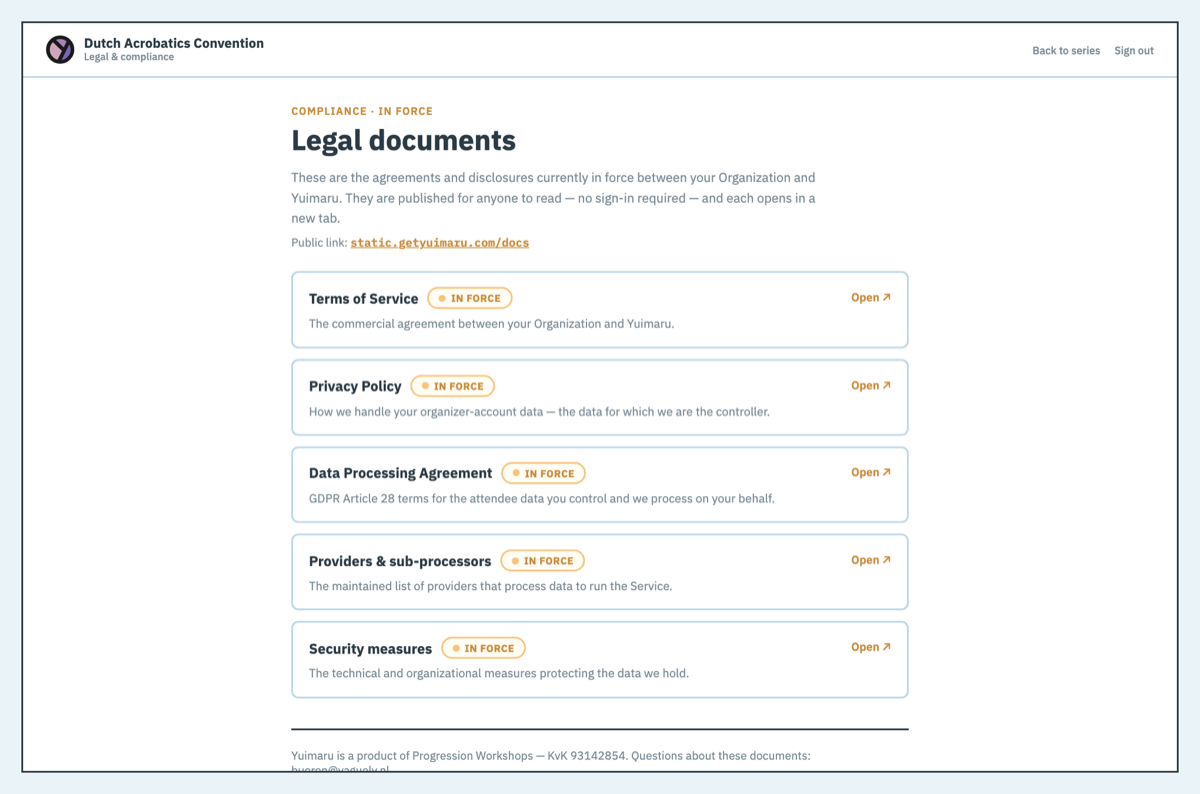
The last link in the top bar is Legal. It opens a screen headed "Legal documents" — a read-only list, so there's nothing you can break here. Each document is marked In force (meaning it's the version currently applying to you) with an Open ↗ link to read the full thing in a new tab.
- Terms of Service — the plain rules for using Yuimaru: what you can expect from us, and what we ask of you.
- Privacy Policy — how Yuimaru looks after personal information and what it does with it.
- Data Processing Agreement — this one covers the attendee data you're responsible for and that Yuimaru handles on your behalf; it's what keeps that arrangement proper and legal.
- Providers & sub-processors — the short list of trusted outside services Yuimaru relies on (like the payment and email services) to run.
- Security measures — a plain description of how your data is kept safe.
At the foot of these documents you'll see the company details: Yuimaru is a product of Progression Workshops, registered with the Dutch chamber of commerce under KvK 93142854. If a legal or accounting question ever needs a real company name, that's it.
Common questions
What's the difference between my subscription and ticket money?
Your subscription is what Yuimaru charges you once a year to use the platform — it's the only thing Yuimaru bills you for. Ticket money is what your attendees pay you for their tickets; it flows straight into your own Mollie account and never passes through Yuimaru at all.
Does Yuimaru take a commission?
No. Yuimaru takes 0% commission and charges no per-ticket fee. Attendees pay you directly through your own payment account or bank, so every ticket payment is yours. The yearly subscription is Yuimaru's only charge.
Can I pass my payment fees on to attendees?
There's no toggle for this, and it's a deliberate choice rather than a missing feature. Under EU payment law (PSD2's surcharge ban), you can't charge a buyer extra just because they paid by card or iDEAL — those are exactly the methods Mollie and Stripe carry your ticket payments over, so a fee that varies by payment method wouldn't be something Yuimaru could legally offer. What other platforms sometimes call "passing on the fee" is really just a flat booking fee added to every ticket regardless of how the attendee pays — which is a fine thing to do, but it's honest to call it a booking fee rather than "the processing cost," since it isn't tied to the real cost of any one payment method. Since Yuimaru already takes 0% commission and charges no per-ticket fee, we've kept this kind of fee machinery out of the product — it's one less thing to configure, and one less way pricing can quietly drift from what it says on the tin. If you want attendees to cover part of your cost, simply price the ticket a little higher.
Does Yuimaru handle VAT or issue invoices for my ticket sales?
No. Yuimaru never holds or processes your ticket money — it goes straight to your own payment account, so Yuimaru isn't in a position to calculate VAT or sales tax on it, and doesn't issue a tax invoice for it today. Whatever price you set for a workshop is the full amount the attendee pays; if VAT or another tax applies to your sales, it's on you to fold that into your price and to handle your own reporting and, if your attendees need one, your own receipt or invoice. This is separate from your yearly Yuimaru subscription, which is billed and invoiced by Yuimaru directly — see "Invoices" above.
What happens if I go over my plan?
Nothing switches off. A friendly banner — "You've grown past your … plan" — appears with an Upgrade plan button, and you have 14 days to move to a bigger plan at your own pace. No attendee is ever affected in the meantime.
Can I cancel?
Yes, any time. On the Plan & billing screen, click Cancel plan. It's not instant or risky — it asks you to Confirm cancel first, so you can't do it by mistake.
Where are the legal documents?
Click Legal in your series top bar. You'll find the Terms of Service, Privacy Policy, Data Processing Agreement, Providers & sub-processors, and Security measures — each marked In force with an Open ↗ link to read it in full.