Organiser Guide › Running an event › Insights & activity
Organiser
Insights & activity log
Two quiet, helpful screens sit in the top bar of your series. One turns everyone's answers into simple numbers so you can plan. The other keeps a tidy record of every change, so you can always see who did what. Neither one is anything to be nervous about — they're just here to help you.
Finding them
Open your series and look along the bar across the top. Two of the links there are Insights and Activity. Click whichever you need — you can come back to this screen any time.
Insights — the numbers, made simple
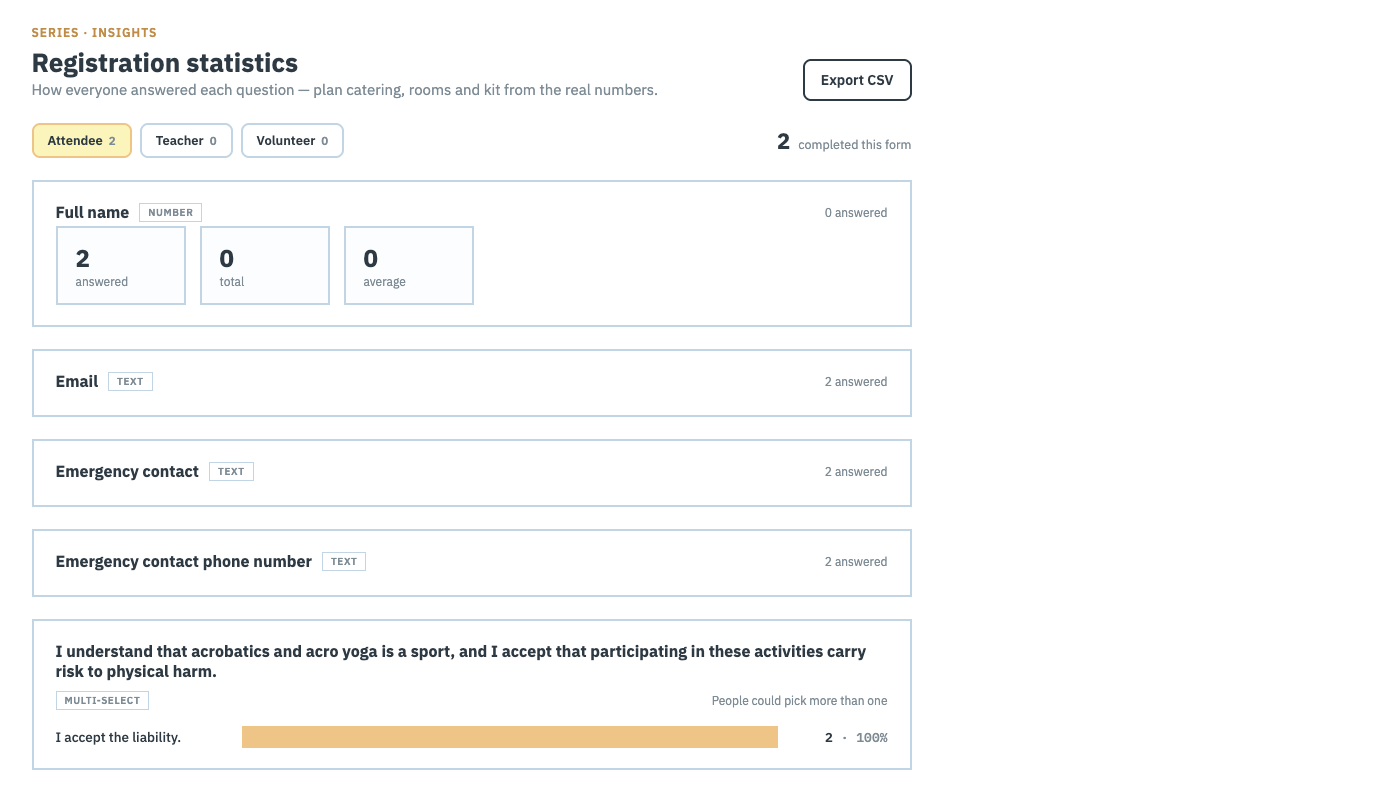
Click Insights and you land on a screen headed "Registration statistics", with the friendly line "How everyone answered each question — plan catering, rooms and kit from the real numbers." In plain words: it takes everything people typed on your sign-up forms and adds it all up for you, so you never have to count by hand.
The three tabs: Attendee, Teacher, Volunteer
Near the top there are three tabs — Attendee, Teacher, and Volunteer. Each one matches a sign-up form you use, and each shows how many people filled that particular form in. Click a tab to see the numbers for that group of people.
What each question looks like
For every question on your form you get its own little card, and the card shows the answers in the way that suits that question best:
- Pick-one and pick-many questions (like "Which meals do you want?") show a row for each choice, with a bar, a plain count of how many people picked it, and the percentage.
- Number questions (like "How many nights are you staying?") show how many people answered, out of the total, plus the average — handy for a quick "roughly how many" feel.
- Free-text questions (where people type their own words) simply show how many people answered, since there's no tidy way to add sentences up.
That's really all there is to it. A card per question, and the answers laid out so you can read them at a glance.
These numbers answer the practical questions that keep organisers up at night. How many vegetarian meals should the caterer make? How big does the room need to be? How many yoga mats to borrow? Instead of guessing, you read the real count straight off the card.
Taking the numbers with you
In the corner of the screen there's an Export CSV button. Click it and Yuimaru downloads all these numbers as a small spreadsheet file (a CSV is just a plain table that opens in Excel, Numbers, or Google Sheets). That way you can email the totals to your caterer or venue without them needing a Yuimaru login.
Activity log — your safety net
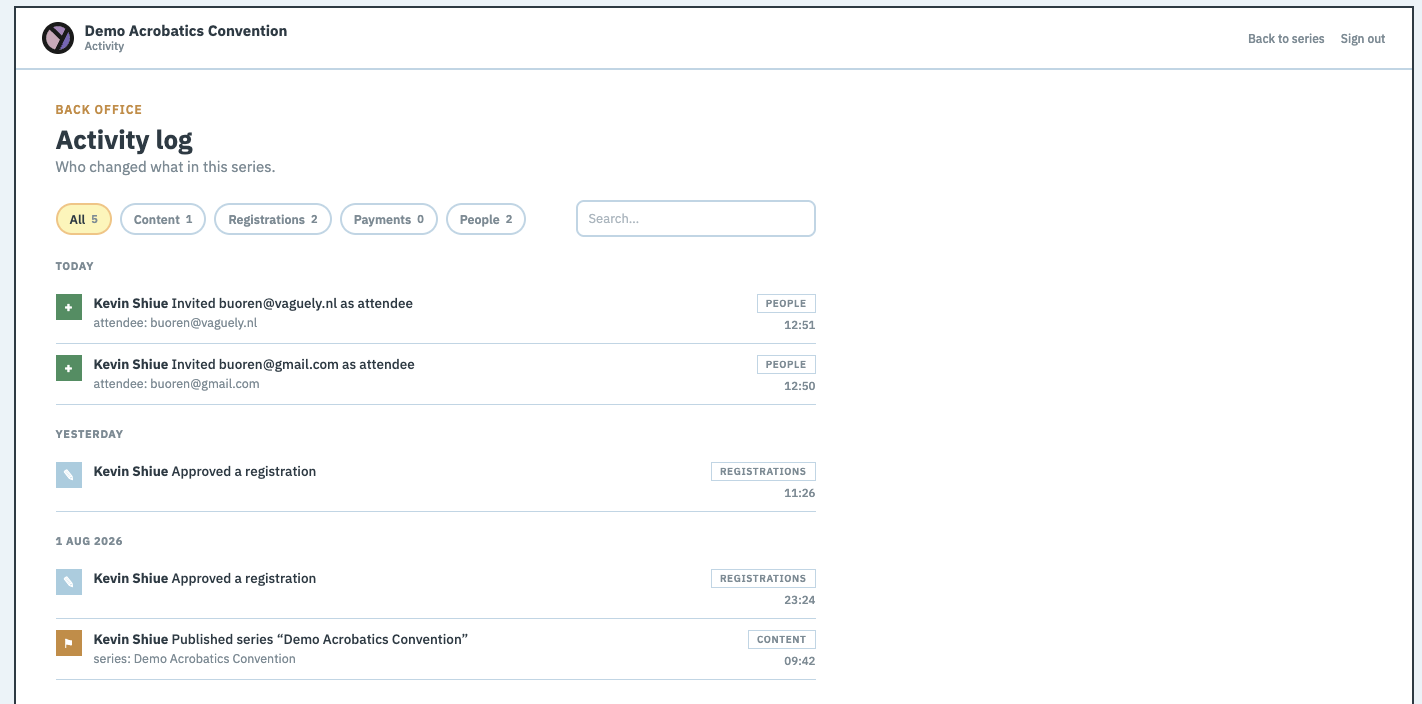
Now click Activity in the top bar. You'll see a screen headed "Activity log" with the line "Who changed what in this series." It's a simple, time-ordered list — newest at the top — of every change anyone has made.
Each line is gently colour-coded so your eye can find things quickly, and it tells you who did something, what they did, and when. Nothing here changes your event — it's a record you read, not a place you edit.
Narrowing it down
Along the top of the log are tabs to filter the list, plus a search box for when you're looking for one particular thing:
- All — everything, together.
- Content — changes to your series, editions, workshops, and forms.
- Registrations — people signing up and their status changing.
- Payments — money marked as paid, refunded, and so on.
- People — organisers and helpers being added or changed.
If you ever wonder "did I change that, or did my co-organiser?", the activity log has the answer. Nothing happens in your series without a line appearing here, so you're never left guessing. Think of it as a friendly paper trail that keeps a team of organisers on the same page.
Common questions
What are Insights for?
They turn everyone's form answers into plain numbers so you can plan the practical side of your event — how many meals to cater, how big a room to book, how much kit to bring. Instead of counting answers yourself, you read the totals straight off each question's card.
Can I download the numbers?
Yes. On the Insights screen, click Export CSV in the corner. Yuimaru downloads a small spreadsheet you can open in Excel, Numbers, or Google Sheets, and share with a caterer or venue who doesn't use Yuimaru.
What's the activity log?
It's a time-ordered list of every change made in your series — newest first, gently colour-coded. You can filter it by All, Content, Registrations, Payments, or People, or search it. It's a record you read, not a place you edit, so nothing there can break anything.
Can I see who changed something?
Yes — that's exactly what the activity log is for. Every line names the person, the change, and the time. So if you're running the event with others, you can always tell who did what, without anyone having to remember.