Teacher Guide › Your teaching › Your teaching profile
Step 2
Your teaching profile
Your face and your name travel with every workshop you teach — on the timetable, on the workshop's details, and on your own teacher page. There are two places it can come from, both yours to edit: your account profile in the main app, which follows you everywhere, and a small teaching profile per festival for when one event wants introducing differently. This chapter shows what appears where.
Where you show up
- On the timetable — your name under the workshop title, with a small round photo.
- On the workshop's details — the same photo and name, next to the description.
- On your teacher page — a page of your own: photo, name, pronouns, any links, a longer bio, and a list of the workshops you teach. People reach it by tapping your name on a workshop.
- In "Who's coming" — the community grid for the edition, where teachers are badged as teachers and listed first.
The bit that's yours: your profile
In the main app, under Account, there are two things worth filling in. They belong to you — not to any one festival — so you set them once and they follow you everywhere:
-
Your account — photo and name
A profile photo and your display name. This is the name and face used across Yuimaru, including on your workshops. Worth five minutes: a clear headshot does a lot of work on a busy timetable.
-
Your community profile — the human part
Behind "Your acro profile": pronouns, city, whether you base or fly, your experience, the skills you're into, and a short About text. There's a Preview so you can see it as others will.
Both screens are walked through, field by field, in Your profile in the attendee guide. Nothing about them is different for teachers — you just have more reason to fill them in.
The per-festival bit: your teaching profile
Your teacher page — the public page listing your workshops — draws on a separate teaching profile that lives with the festival's programme: a photo, a bio, pronouns and links, kept alongside your workshops. It's per festival on purpose, so you can introduce yourself one way at a family weekend and another at a hand-balancing intensive.
This one is yours to edit. In the Back Office, open the festival and use the Teacher profile link in the bar across the top. You'll get a screen headed Teacher profile with the line "How you're introduced to attendees for this event. Started from your teacher registration — edit it freely; what you originally submitted is kept separately."
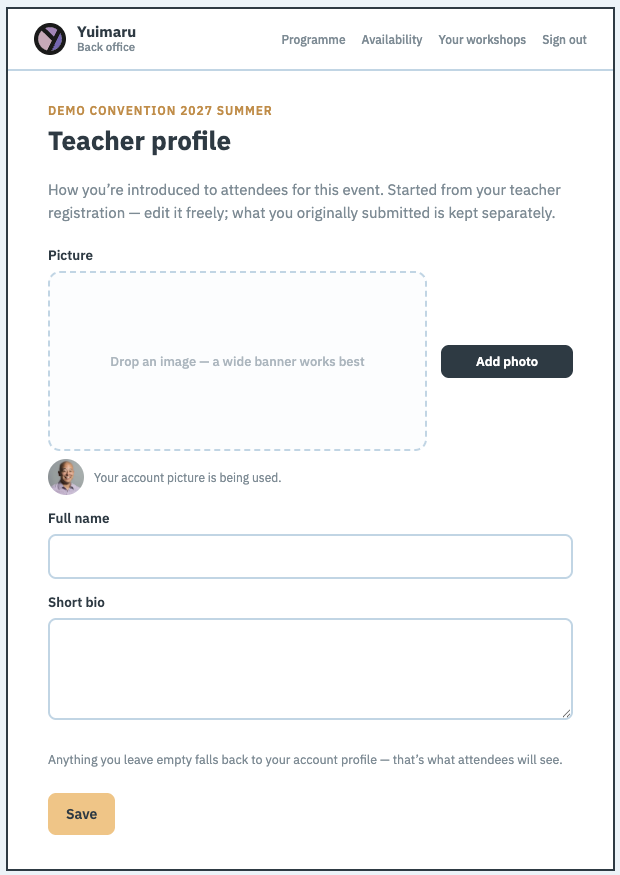
A Picture, a Full name and a Short bio are always there to fill in, followed by whatever else your organiser's teacher form asked. If they never set a form up, you get a sensible standard one — so there's no festival where you're stuck without a way to introduce yourself.
The picture box takes a drag-and-drop or an Add photo button, and it notes that "a wide banner works best" — this one sits at the top of your teacher page, so a wide crop suits it better than a square headshot.
Anything you leave blank falls back to your account profile, and the editor shows you the actual fallback rather than an empty box — "Your account picture is being used", "From your account profile". So what you see on this screen is what attendees will see. Fill in a field only when you want this festival to show something different.
Your teaching profile starts from whatever you filled in on the organiser's teacher sign-up form, but editing it here doesn't touch that original submission — that stays on record as what you actually submitted and agreed to. You can see the data policies you accepted, and when, under Legal in the Back Office.
Who can see you
Your community profile has a Visibility setting, and it does what it says. Set it to private and you're left out of the "Who's coming" grid entirely — no card, no teacher badge.
A private profile does not take your name off the workshops you teach — the programme still credits you, because that's what tells people whose class it is. Visibility only governs the community pages.
Common questions
My teacher page has no photo or bio — why?
Because your teaching profile for that festival is empty and your account has no picture or bio either. Open Teacher profile in the Back Office and fill in a photo and a couple of sentences — or fill in your account profile in the main app, and every festival picks it up at once.
My name is spelled wrong on a workshop
If you're signed in, change your display name in Account and it updates everywhere it's drawn from your account. If it's still wrong for one festival in particular, that festival has a teaching name of its own on file — open Teacher profile there and correct it.
Do I have one profile per festival?
You have one account and one community profile that go with you everywhere, plus a small teaching profile per festival for how that particular programme introduces you. Leave the per-festival one empty and your account is used instead.
Can I hide my email?
Yes — your email is only shown on your community profile if you choose the most open visibility setting. See Your profile for what each option shares.
Where does my "teacher" badge come from?
From teaching. Anyone teaching a workshop in an edition is badged as a teacher on that edition's "Who's coming" page, and sorted to the front. There's nothing to switch on.